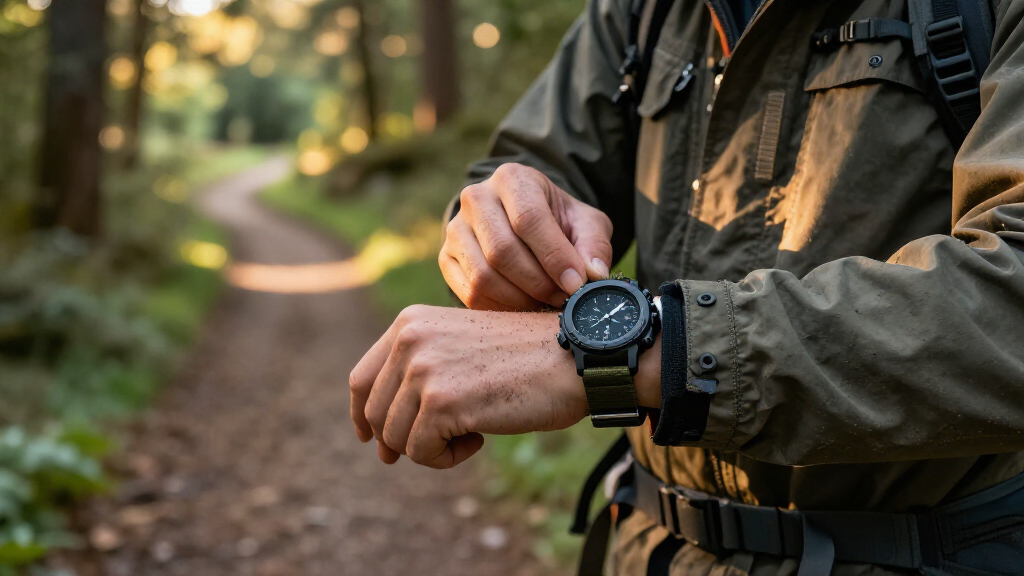

Choose and set up a military-style tactical watch that suits your activities, then check that it fits, stays readable, and keeps time as expected. This guide is for beginners comparing watches for hiking, field training, travel, or everyday use. Allow 30-60 minutes for selection and setup, with several days of routine wear to observe timekeeping.

Get your wardrobe favorites delivered free with Prime
- Fast, free delivery on millions of items
- Prime Video, Amazon Music and more included
- Member-only deals all year

Garmin Instinct 3 Tactical Solar 45mm Black
- ✔ Case size: 45 × 45 × 14.9 mm
- ✔ Case and bezel: Fiber-reinforced polymer case; metal-reinforced bezel
- ✔ Water resistance: 10 ATM (100 meters)

Casio Illuminator AE1500WH Digital Watch
- ✔ Display: Extra-large digital
- ✔ Water resistance: 100 meters
- ✔ Battery: CR2032 lithium; approximately 10 years stated
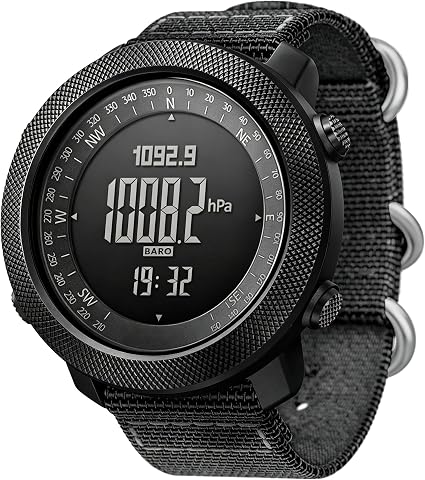
CakCity Digital Military Tactical Watch for Men – 50mm Large Face
- ✔ Case: 50 mm zinc alloy; 16 mm thick
- ✔ Glass: Hardened mineral glass
- ✔ Strap: Double-layer nylon, 18.5–24 cm length
Difficulty: Beginner | Time: 30-60 minutes, plus several days to observe timekeeping
What You’ll Need
Tools & Materials:
- A shortlist of watches or a store where you can try them on
- The watch manual or manufacturer’s setup instructions
- A phone or another reliable clock for comparison
- A soft cloth for cleaning the watch
Knowledge:
- Your intended activities and approximate budget
- Whether you prefer a digital, analog, or hybrid display
“Tactical” is a marketing description, not a guarantee of military certification or ruggedness. Check the manufacturer’s specifications for water resistance, operating range, battery type, and warranty. Do not assume a watch is suitable for diving, impact, or hazardous work based on its appearance.
Garmin Instinct 3 Tactical Solar 45mm Black
The Garmin Instinct 3 Tactical Solar is the most complete military-style option here because it combines rugged construction with tools the other two watches do not offer. Multi-band GPS, a three-axis compass, and a barometric altimeter give it a stronger role in route finding and outdoor navigation than the Casio AE-1500WH, whose focus is timing and timekeeping. Its stealth mode, jumpmaster activity, built-in flashlight, and Applied Ballistics solver add tactical functions; the solver requires a separate purchase through a mobile app, so that capability carries an extra step.For buyers who spend long days outdoors, solar charging and 10 ATM water resistance make a compelling combination. Garmin states that solar can support unlimited battery life under its specific sunlight conditions, but we should treat that as conditional rather than guaranteed. The Casio’s stated ten-year battery life is simpler and does not depend on sun exposure or charging habits. Garmin also tracks heart rate, sleep, and Pulse Ox, making it more useful for people who want training and health information alongside field tools.The tradeoff is complexity. At 45 mm and 14.9 mm thick, this is a substantial watch, and it has no LTE for standalone cellular use. It also lacks the simple, low-maintenance character of the Casio. Choose Garmin when navigation, tactical features, and health tracking earn their place in our routine; skip it if we mainly need a readable clock with alarms and a stopwatch.
Pros:
- Multi-band GPS, compass, and barometric altimeter support navigation.
- Stealth mode, jumpmaster activity, and built-in LED flashlight add tactical utility.
- Solar charging can extend battery life with sufficient sunlight.
- 10 ATM water resistance and MIL-STD-810 certification support rugged use.
Cons:
- Applied Ballistics solver requires an additional purchase through a mobile app.
- Solar performance depends on sunlight exposure and use conditions.
- No LTE connectivity for standalone calls or data.
Best for: Outdoor users who want GPS navigation, tactical functions, health tracking, and solar charging in one rugged watch.
Not ideal for: Buyers who want a simple, inexpensive-to-run digital watch, need cellular connectivity, or do not expect to use its advanced tools.
Bottom line: We recommend the Garmin when its navigation and tactical toolkit matter enough to justify smartwatch complexity and sunlight-dependent charging.
“We recommend the Garmin when its navigation and tactical toolkit matter enough to justify smartwatch complexity and sunlight-dependent charging.”
Casio Illuminator AE1500WH Digital Watch
The Casio AE-1500WH makes the most sense when a tactical-style watch should be easy to read, easy to operate, and ready for daily use without a charging routine. Its extra-large display helps us check the time at a glance, while dual time, five alarms, a stopwatch, and a countdown timer cover travel and training basics. Compared with Garmin’s sensor-rich Instinct, the Casio gives up GPS, health tracking, and tactical modes. In return, it keeps the experience straightforward.Its stated battery life of up to ten years is the key practical advantage over the CakCity, which also runs on a CR2032 but has no comparable longevity stated in the supplied details. A 100-meter water-resistance rating also matches Garmin’s listed depth rating and exceeds CakCity’s 5 ATM rating. The khaki resin band gives it an outdoors-oriented look, but the resin crystal is more vulnerable to scratches than the CakCity’s hardened mineral glass.We should choose this Casio for reliable timekeeping and timing functions, not field navigation. It has no compass or altimeter, and its utilitarian design offers limited style variety. The amber LED backlight supports visibility in low light, but buyers seeking a tactical dashboard, route guidance, or connected health features will get substantially more from Garmin. Against CakCity, Casio is the simpler and longer-life choice; CakCity is better equipped for basic outdoor readings.
Pros:
- Extra-large digital display is easy to scan.
- Stated battery life reaches up to ten years on a CR2032.
- 100-meter water resistance suits swimming and wet conditions.
- Dual time, five alarms, stopwatch, and countdown timer cover everyday utility.
Cons:
- Resin crystal is more prone to scratches than hardened mineral glass.
- No GPS, compass, altimeter, or connected smart features.
- Utilitarian styling has limited variety.
Best for: Buyers who want a large, readable digital watch with practical alarms and timers, substantial water resistance, and long stated battery life.
Not ideal for: Users who need GPS navigation, a compass, health tracking, a scratch-resistant crystal, or smart connectivity.
Bottom line: We favor the Casio when long battery life and quick, clear timekeeping matter more than navigation or tactical sensors.
“We favor the Casio when long battery life and quick, clear timekeeping matter more than navigation or tactical sensors.”
CakCity Digital Military Tactical Watch for Men – 50mm Large Face
The CakCity Digital Tactical Watch occupies the middle ground between Casio’s basic timekeeping and Garmin’s connected navigation suite. Its compass, altimeter, and barometer give us more immediate outdoor information than the Casio provides, without adding Bluetooth or app integration. That simplicity may suit buyers who want readings on the watch itself, though the supplied details do not establish the capabilities or precision of those sensors as a replacement for dedicated navigation equipment.Its 50 mm zinc-alloy case and hardened mineral glass create a more substantial feel than Casio’s resin construction, and the double-layer nylon strap offers a different fit from Garmin’s silicone band. The large face may aid readability, but 50 mm is a considerable wrist presence and the watch weighs 118 grams. This is the bulkiest option in the lineup by diameter, so the Garmin may be the more manageable choice for users who want a broad feature set in a smaller listed case.Water resistance is the clearest compromise: 5 ATM is below the 100-meter ratings on both Garmin and Casio. The CakCity also uses a CR2032 battery, with no long-life estimate provided, and lacks the Casio’s stated decade-long battery life. Choose it for a large display and built-in outdoor readings at a glance. Skip it if we need higher water resistance, a compact fit, GPS, app support, or a clearly specified long battery interval.
Pros:
- Compass, altimeter, and barometer provide outdoor readings on the watch.
- Hardened mineral glass is a more scratch-resistant material than Casio’s resin crystal.
- Nylon strap and zinc-alloy case offer a different feel from resin and silicone alternatives.
- EL backlight supports reading in low-light conditions.
Cons:
- 50 mm case and 118 g weight may feel bulky, especially on smaller wrists.
- 5 ATM water resistance is lower than the 100-meter ratings of the other two picks.
- CR2032 battery life is not specified, and there is no Bluetooth or app integration.
Best for: Buyers who want a large digital watch with compass, altimeter, and barometer readings without Bluetooth or app features.
Not ideal for: People with smaller wrists, frequent swimmers, or users who need GPS, connected functions, or a stated long battery life.
Bottom line: We would pick CakCity for its on-watch outdoor readings and large display, while accepting a bulkier fit and lower water rating.
“We would pick CakCity for its on-watch outdoor readings and large display, while accepting a bulkier fit and lower water rating.”
As an Amazon Associate we earn from qualifying purchases.
Before You Start
Write down where and how you expect to use the watch. A hiker may value a compass, altimeter, long battery life, and controls that work with gloves. Someone who mainly needs a durable daily watch may prefer a clear display, simple alarms, and fewer features to maintain. Set a spending limit, and check the return policy before buying.
Read the watch’s manual before changing settings or exposing it to water. Water resistance can decline as seals age or after repairs. Buttons and crowns should not be operated underwater unless the manufacturer explicitly allows it.
Step-by-Step Instructions
Step 1: List the tasks the watch must handle
Write down your main activities, such as walking, field training, travel, or daily wear. Rank the features you will use most: readable time, stopwatch, timer, alarms, backlight, compass, GPS, or health tracking. Mark each feature as required or optional so a long feature list does not distract you from your actual needs.
Tip: A feature that depends on frequent charging may be a poor fit for a trip where charging is difficult.
Check: You have a short list of required features and a separate list of optional ones.
Step 2: Set your budget and power preference
Choose a maximum price before comparing models. Decide whether you prefer a replaceable battery, rechargeable battery, or solar-assisted charging. Check the maker’s stated battery life under the settings you plan to use; GPS, frequent backlight use, and notifications can reduce runtime.
Tip: Find out whether a battery change requires a service center to preserve the watch’s seals or warranty.
Check: You know your price ceiling and how you will keep the watch powered.
Step 3: Compare specifications and limitations
Read the manufacturer’s specifications for case size, weight, water resistance, operating temperature, glass, battery life, and warranty. For navigation features, check whether the watch has built-in GPS or only connects to a phone. Verify whether maps, compass calibration, or other features work without a phone signal.
Tip: A water-resistance rating describes a tested condition; it does not make every watch safe for every water activity. Follow the manufacturer’s guidance.
Check: Each shortlisted watch meets your required specifications, and you can describe its main limitations.
Step 4: Check the display and controls
View the watch in bright light and in a dim room. Confirm that you can read the time at a glance and activate the backlight without fumbling. If possible, try the controls while wearing the gloves you use for your activities. For an analog display, check that the hands stand out clearly against the dial.
Tip: A busy dial or small labels can slow down quick checks, even when the watch has many functions.
Check: You can read the time in expected lighting and operate the main controls comfortably.
Step 5: Try the watch on and adjust the band
Place the watch just above your wrist bone and fasten the band so it stays in place without pinching. Bend your wrist, make a fist, and move your hand through your normal range of motion. Check that the case does not dig into your hand and that the band stays secure. Confirm that a replacement band is available if you expect heavy wear.
Tip: A bulky case can catch on sleeves or equipment. Test it under the clothing and gear you expect to use.
Check: The watch feels secure during movement, leaves no painful pressure points, and fits under or over your usual sleeve as intended.
Step 6: Set the time, date, and basic preferences
Follow the manual to set the time, date, and preferred time format. Set the correct time zone and daylight-saving option if available. Choose a display layout you can read quickly, and adjust the backlight timeout or button lock using the manufacturer’s instructions. Turn off optional alerts you do not need.
Tip: If the watch has a crown, screw-down controls, or a button lock, learn how to secure them before wearing it in wet or rugged conditions.
Check: The display shows the correct time and date, and the basic controls respond as described in the manual.
Step 7: Configure only the activity features you need
Set alarms, a timer, or a stopwatch for the tasks you listed. If the watch has a compass, GPS, or altimeter, calibrate it according to the manual and check the conditions each feature requires. Download maps or activity data in advance if the maker’s app supports offline use. Keep a paper map, separate compass, or other backup when navigation matters.
Tip: Electronic navigation features can depend on battery charge, satellite reception, calibration, or a phone connection. Check those dependencies before leaving.
Check: Your required features are configured, and you know how to access them without searching through unused menus.
Step 8: Check fit, function, and timekeeping in use
Wear the watch during ordinary movement before relying on it for a demanding activity. Test the alarm, backlight, timer, and any required navigation feature in a safe setting. Compare the displayed time with a trusted clock at the start and after several days. Note any drift, charging needs, or discomfort.
Tip: Do not test water resistance by deliberately submerging a watch unless the maker’s instructions say that the model and its current condition are suitable.
Check: The watch stays comfortable, performs the features you need, and keeps time within the manufacturer’s stated specifications.
Common Mistakes to Avoid
- Buying by appearance or the word “tactical” alone. — Compare the published specifications with your actual activities, and check the warranty and service options.
- Choosing a case that is too large or heavy. — Try the watch on, move your wrist, and check how it fits with sleeves and equipment.
- Assuming water resistance makes every water activity safe. — Follow the exact use limits in the manual, and have seals checked when the manufacturer recommends it.
- Relying on GPS or compass functions without checking their dependencies. — Learn whether features need a phone, satellite reception, calibration, or frequent charging, and carry a backup for navigation.
Troubleshooting
Problem: The watch is hard to read in bright light or at night.
Solution: Change the display contrast or backlight settings if available. Recheck the watch in the lighting where you plan to use it. If readability remains poor, choose a clearer display.
Problem: The compass gives inconsistent directions.
Solution: Move away from metal objects and electronics, then recalibrate it according to the manual. Check whether the watch must be held level or moved in a specific pattern.
Problem: GPS takes a long time to connect or shows no position.
Solution: Move to an open area, confirm GPS is enabled, and allow time for reception. Check the manual for satellite, phone, or app requirements, and use a backup navigation method if reception remains unavailable.
Problem: The watch loses time or its battery runs down quickly.
Solution: Compare the time with a trusted clock, review the accuracy range in the specifications, and reduce power-intensive settings such as GPS and frequent backlight use. Replace or recharge the battery as directed; contact the maker if time drift exceeds its stated range.
What Success Looks Like
The watch fits securely without restricting wrist movement, displays the time clearly in your normal lighting, and provides quick access to the functions you selected. Its timekeeping and battery behavior match the manufacturer’s published specifications during routine wear. You also know its water and navigation limits and have a backup plan for any feature that depends on power, phone service, or satellite reception.
Next Steps
Keep the manual and warranty details where you can find them. Clean the watch and band using the manufacturer’s care instructions, inspect the band and controls regularly, and follow the recommended service schedule for seals or batteries. Before a trip or training session, charge the watch, check alarms and navigation, and pack a suitable backup. Reassess the settings when your activities or power needs change.
Frequently Asked Questions
Do tactical watches meet a military standard?
Some models may meet specific published standards, but the word “tactical” alone does not certify a watch. Check the manufacturer’s documentation for the exact standard and conditions tested.
Should I choose digital or analog?
Choose the display you can read fastest. Digital models often make timers and alarms easy to access; analog models can be simple for quick time checks. Try both styles if possible.
Can I use a watch compass as my only navigation tool?
Use it as one tool, not your only one, when getting lost could create a problem. Compass readings can be affected by nearby metal or electronics, and electronic features may need power or calibration. Carry a map and a separate compass when appropriate.
How tight should the watch band be?
Fasten it securely enough that the watch does not slide around, while leaving room for comfortable wrist movement. Loosen or reposition it if it pinches, leaves painful marks, or catches when you bend your wrist.
How often should I replace the battery or service the watch?
Follow the schedule and service instructions for your model. Battery life varies with settings and use; have water-resistant models serviced as recommended, especially after opening the case or replacing a battery.